

Domain Expiry Monitoring
Domain expiry monitoring is the practice of tracking a domain’s renewal date and getting alerted before it lapses - rather than finding out when the domain stops resolving, a client emails you, or a squatter has already picked it up.
It sounds simple, but it’s one of the most common ways businesses lose a domain: auto-renewal fails silently, a payment card expires, or a domain registered years ago by someone who’s since left the company quietly slips past its renewal date. Expiry monitoring exists to make that impossible to miss.
How Expirity tracks expiry
Section titled “How Expirity tracks expiry”Expirity looks up each domain’s registration data via RDAP (with a WHOIS fallback for registries that don’t yet support RDAP) and extracts the current expiry date directly from the registry record - not from an estimate or a cached value.
This means Expirity sees a renewal the moment it’s reflected in the registry, and also catches anything unexpected - like a domain that was renewed for a shorter period than usual, or one a previous owner let lapse.
Check frequency
Section titled “Check frequency”| Plan | Frequency |
|---|---|
| Starter | Every 24 hours |
| Pro / Agency | Near real-time (hourly) |
You can also trigger an immediate check at any time with Check now on any domain, regardless of plan.
Alert thresholds
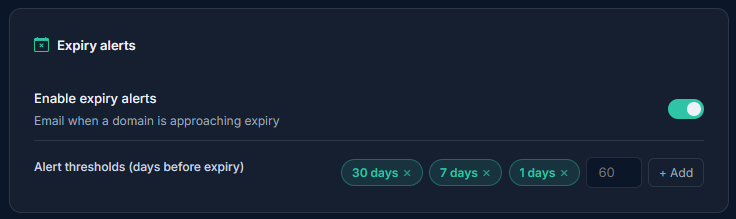
Section titled “Alert thresholds”Expirity alerts by default at 30, 7, and 1 days before expiry. On Pro and Agency, these thresholds are fully customizable from Notifications - set them to whatever lead time fits how you operate, including additional thresholds for longer lead times. Starter accounts use the default thresholds.
Each threshold only fires once per domain per renewal cycle - once you’ve renewed, the alert clock resets automatically.
What you’ll see in the dashboard
Section titled “What you’ll see in the dashboard”Every monitored domain shows days remaining at a glance, color-coded by urgency:
- Healthy - more than 30 days remaining
- Expiring - 30 days or fewer
- Critical - 7 days or fewer
This is the same logic that drives the dashboard’s “Needs attention” filter, so domains approaching expiry surface immediately without digging through a full domain list.
Related
Section titled “Related”- Email Alerts & Thresholds - configuring where and how you’re notified
- Registrar & Nameserver Change Alerts - catching unexpected registrar transfers
- Per-Client Alert Routing - sending expiry alerts to the client who owns the domain, not just your own inbox