

Upgrading or Downgrading Your Plan
You can change your plan tier or billing interval at any time from Billing. What changes immediately versus what’s scheduled depends on the direction of the change.
Upgrades
Section titled “Upgrades”Moving to a higher tier (Starter → Pro, Pro → Agency) or switching from monthly to annual billing applies immediately - you get access to the new tier’s features and limits right away, with the price difference prorated for the rest of your current billing period.
Downgrades
Section titled “Downgrades”Moving to a lower tier, reducing domain pack quantity, or switching from annual to monthly billing takes effect at the end of your current billing period, not immediately. You keep your current plan’s features and limits until then - there’s no mid-cycle loss of access.
This means if you downgrade partway through a billing period, you’ll see the change reflected on Billing as scheduled, with the new plan taking over on your next renewal date.
Previewing a change
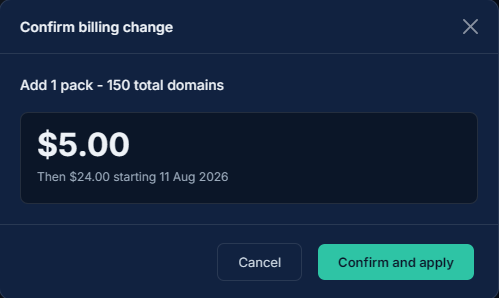
Section titled “Previewing a change”Before confirming a plan or pack change, Expirity shows a preview of what you’ll be charged (or credited) immediately and what your new recurring amount will be going forward, so there are no surprises on your next invoice.
What happens to your domains on downgrade
Section titled “What happens to your domains on downgrade”If a downgrade puts you over your new plan’s domain limit, your existing domains and their full monitoring history are preserved - you simply won’t be able to add new domains until you’re back under the limit. Features tied to your previous tier (like the REST API or client folders) become inaccessible but aren’t deleted; if you upgrade again later, everything is exactly as you left it.
Canceling
Section titled “Canceling”Canceling your subscription downgrades your account to the free Starter plan at the end of your current billing period, following the same scheduled-downgrade behavior described above.