

DNS Monitoring & Change Detection
DNS changes are often the quietest kind of incident. A record gets removed during a migration and nobody notices until email starts bouncing. An SPF record drifts out of sync with an email provider and deliverability silently drops. A DNSSEC misconfiguration breaks resolution for a subset of users. None of these show up as an obvious outage - they show up as a slow trickle of “something’s wrong” that’s hard to trace back to a DNS change days or weeks earlier.
Expirity monitors DNS records on every check and alerts when something changes, so you have a timestamp and a diff instead of a guessing game.
Record types monitored
Section titled “Record types monitored”Expirity checks: A, AAAA, MX, NS, CNAME, TXT, CAA, SOA, SPF, DMARC, and DNSSEC status.
Lookups run against a primary resolver with automatic fallback to a secondary resolver, so a transient resolver issue doesn’t get mistaken for an actual DNS change.
What counts as a change
Section titled “What counts as a change”Expirity compares each check’s results against the last known snapshot and logs an event when:
- A record is added - a new record type or value appears
- A record is removed - a previously-present record is gone
- DNSSEC status changes - enabled or disabled
- SPF or DMARC records change - relevant for email deliverability and anti-spoofing posture
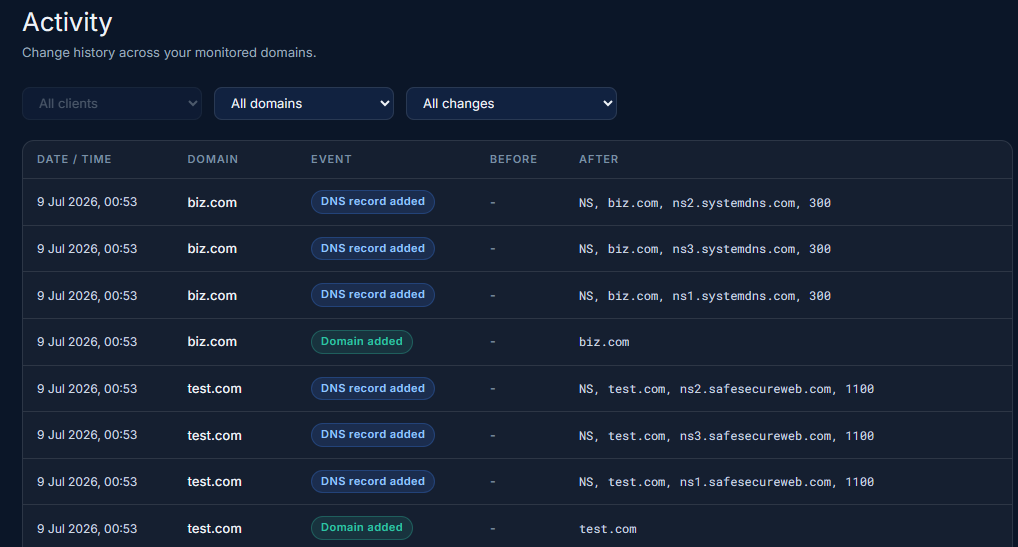
Every change is written to the domain’s Activity log with the old and new value, so you can see exactly what changed and when - not just that something did.
Plan differences
Section titled “Plan differences”On the first check of a new domain, Expirity records all NS records as a baseline regardless of plan. Full DNS record monitoring across all types, and ongoing change-detection alerts, are available on Pro and Agency.
Alerts
Section titled “Alerts”DNS, DNSSEC, SPF, and DMARC change alerts are off by default and can be turned on per type from Notifications on Pro and Agency - useful if you only care about, say, NS changes and not every TXT record edit.