

Team Members & Roles
Agencies and MSPs are rarely a one-person operation managing every domain - Expirity’s team access lets you bring colleagues in with exactly the level of access each role needs, without sharing a single login. Available on Agency, up to 10 team members per account.
| Owner | Admin | Editor | Viewer | |
|---|---|---|---|---|
| View billing & integrations | ✓ | ✓ | - | - |
| Manage team | ✓ | ✓ | - | - |
| Manage notification settings | ✓ | ✓ | - | - |
| Add / delete / import domains | ✓ | ✓ | ✓ | - |
| Manage clients | ✓ | ✓ | ✓ | - |
| Toggle monitoring, edit notes | ✓ | ✓ | ✓ | - |
| Check now | ✓ | ✓ | ✓ | ✓ |
| View activity | ✓ | ✓ | ✓ | ✓ |
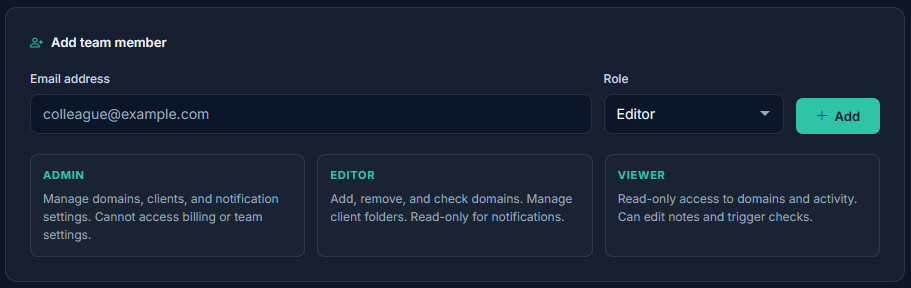
Admin has the same access as the account owner across every area except being the billing owner itself. Editor can do the day-to-day domain management work without touching billing, team, or notification settings. Viewer is read-only with the ability to trigger a manual check - a fit for clients or stakeholders who need visibility without edit access.
Adding a team member
Section titled “Adding a team member”From Team, enter the person’s email and select a role, then click Add. They receive a welcome email and sign in with their own Google account - no shared credentials. An email already used by another Expirity account owner can’t be added as a team member.
Changing roles or removing access
Section titled “Changing roles or removing access”Change a member’s role from the dropdown next to their name at any time, or remove them entirely with Remove - both take effect immediately, no confirmation email required.
What team members see
Section titled “What team members see”Team members sign in and land in the same account as the owner - they’re managing the owner’s domains and clients, not a separate workspace. Restricted pages (Billing, Integrations, Team, Notification settings) appear locked in the sidebar for roles that don’t have access, rather than being hidden entirely, so it’s clear what exists without granting access to it.