

Email Alerts & Thresholds
Email is Expirity’s default alert channel, available on every plan with no setup required - alerts go out automatically from the moment you add a domain.
What triggers an email alert
Section titled “What triggers an email alert”- Expiry alerts - domain approaching its renewal date
- SSL alerts - certificate approaching expiry, or a status change (expiring, expired, renewed)
- Registrar changes - unexpected registrar transfer
- Nameserver changes - unexpected nameserver change
- DNS, DNSSEC, SPF, DMARC changes - Pro/Agency only, off by default
- Monitoring paused/resumed - confirms a toggle action took effect
Thresholds
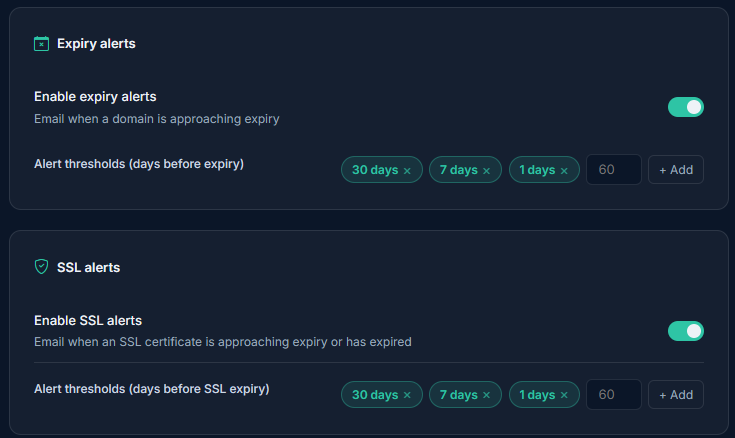
Section titled “Thresholds”Expiry and SSL alerts use day-based thresholds - by default 30, 7, and 1 days before the event. On Pro and Agency, thresholds are fully customizable from Notifications: add, remove, or change the day counts to match your own lead-time preferences. Starter accounts use the default thresholds.
Each threshold fires once per cycle - you won’t get the same alert repeated daily as a domain counts down.
Where alerts go
Section titled “Where alerts go”By default, alerts go to your account email. You can set a different notification email from Notifications without changing your login email - useful if you want alerts going to a shared inbox or distribution list rather than your personal address.
On Agency, domains assigned to a client can route alerts to that client’s email instead - see Per-Client Alert Routing.
Turning alerts off
Section titled “Turning alerts off”Each alert type can be toggled independently. Turning off expiry or SSL alerts entirely is possible but not recommended - if you want fewer emails, narrowing the thresholds is usually a better fit than disabling the alert outright.